Contents
These tutorials intend to explain how this infrastructure works through hands-on learning, building your understanding progressively from fundamentals to advanced topics.
About these tutorials
Section titled “About these tutorials”In accordance with the diataxis user documentation framework, these tutorials are learning-oriented. They guide you through exercises that build skills and understanding, explaining why things work the way they do, as opposed to only how to do them.
This differs from the Guides section, which is task-oriented. Guides help you accomplish specific goals when you already understand the system. Tutorials build the understanding that makes guides useful.
| Tutorials (this section) | Guides |
|---|---|
| Learning-oriented | Task-oriented |
| Teach concepts and skills | Accomplish specific goals |
| Progressive skill building | Step-by-step procedures |
| Include “why” explanations | Focus on “how” steps |
| For building understanding | For getting things done |
Start with tutorials when you’re new to the system or a particular area. Switch to guides when you need to accomplish something specific.
Recommended learning path
Section titled “Recommended learning path”If you’re new to this infrastructure, follow this sequence:
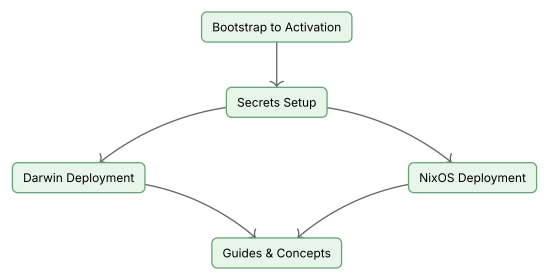
1. Bootstrap to Activation
Section titled “1. Bootstrap to Activation”Bootstrap to Activation — Start here.
Learn how to set up a machine from scratch. You’ll understand Nix flakes, the deferred module composition pattern, direnv integration, and the activation process.
- Prerequisites: macOS or NixOS machine with admin access
- Teaches: Nix fundamentals, repository structure, first activation
- Estimated time: 45-60 minutes
2. Secrets Setup
Section titled “2. Secrets Setup”Secrets Setup — Essential for any real use.
Learn how secrets management works. You’ll understand secrets management with clan vars and legacy sops-nix, derive age keys from SSH keys, and set up encrypted secrets that deploy with your configuration.
- Prerequisites: Completed Bootstrap to Activation
- Teaches: Age encryption, sops-nix, Bitwarden integration
- Estimated time: 30-45 minutes
3. Platform-specific deployment
Section titled “3. Platform-specific deployment”Choose based on your target platform:
For macOS users
Section titled “For macOS users”Darwin Deployment — Complete macOS setup.
Learn the full darwin deployment workflow including zerotier mesh networking. You’ll understand how nix-darwin differs from NixOS and the practical implications.
- Prerequisites: Completed Bootstrap, Secrets Setup
- Teaches: nix-darwin, Homebrew integration, zerotier mesh
- Estimated time: 60-90 minutes
For server administrators
Section titled “For server administrators”NixOS Deployment — Cloud server deployment.
Learn how to provision infrastructure and deploy NixOS servers. You’ll understand terranix, clan orchestration, and multi-cloud patterns.
- Prerequisites: Completed Bootstrap, Secrets Setup
- Teaches: Terranix, clan deployment, multi-cloud
- Estimated time: 90-120 minutes
Tutorial catalog
Section titled “Tutorial catalog”Your entry point into this infrastructure.
What you’ll learn:
- How Nix flakes provide reproducible configuration
- The deferred module composition pattern for module organization
- Development shell activation with direnv
- Building and activating your first configuration
Prerequisites: macOS or NixOS machine, git, internet access
Secure credential management from first principles.
What you’ll learn:
- Secrets management with clan vars and legacy sops-nix migration
- Age key derivation from SSH keys
- Creating and managing encrypted secrets
- Platform differences (darwin vs NixOS)
Prerequisites: Completed Bootstrap to Activation, SSH key in Bitwarden
Complete macOS machine deployment.
What you’ll learn:
- nix-darwin configuration and activation
- Homebrew integration for system extensions
- Zerotier mesh networking setup
- Darwin-specific secrets patterns
Prerequisites: Completed Bootstrap and Secrets tutorials, macOS machine
Cloud infrastructure and NixOS server deployment.
What you’ll learn:
- Infrastructure provisioning with terranix
- Clan-based deployment orchestration
- Multi-cloud patterns (Hetzner, GCP)
- Clan vars and legacy sops-nix on NixOS
Prerequisites: Completed Bootstrap and Secrets tutorials, cloud provider access
After completing tutorials
Section titled “After completing tutorials”Once you’ve worked through the relevant tutorials, you’re ready to:
Use the guides
Section titled “Use the guides”The Guides section provides task-oriented procedures:
- Getting Started — Quick command reference
- Host Onboarding — Adding new machines
- Secrets Management — Secret operations
Deepen your understanding
Section titled “Deepen your understanding”The Concepts section explains the architecture:
- Deferred Module Composition — Module organization pattern
- Clan Machine Management — Multi-machine coordination
- System-user Integration — User configuration approaches
Reference the CLI
Section titled “Reference the CLI”The Reference section documents tools:
- justfile recipes — Task runner commands
- nix flake apps — Nix-wrapped activation commands
- CI jobs — Continuous integration reference
Getting help
Section titled “Getting help”If you get stuck:
- Check the troubleshooting section at the end of each tutorial
- Search the guides for specific error messages
- Review the concepts if something doesn’t make sense
- Ask for help with specific details about what you tried and what happened